You can quickly move funds between your own wallets within your Moneybase Business account.
Step 1: Open the Transfer page
- From the left-hand menu, select Payments.
- Click Transfer.
- Select the Own Wallets tab.
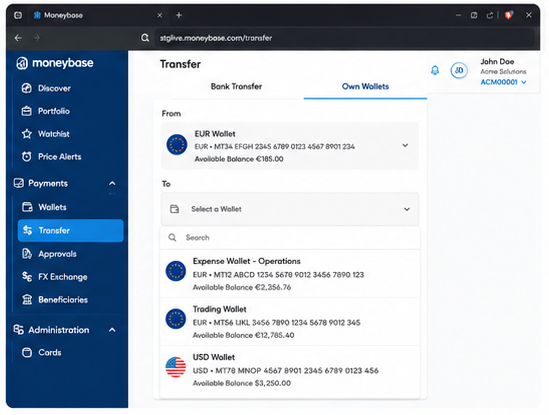
Step 2: Select the wallets
- Choose the wallet you would like to transfer funds from.
- Select the wallet you would like to transfer funds to.
The available balance for each wallet is displayed to help you choose the correct source and destination wallets.
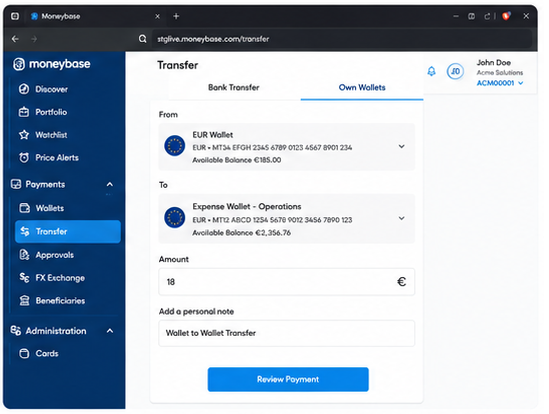
Step 3: Enter the transfer details
- Enter the amount you wish to transfer.
- Optionally, add a personal note to help identify the transfer.
- Click Review Payment.
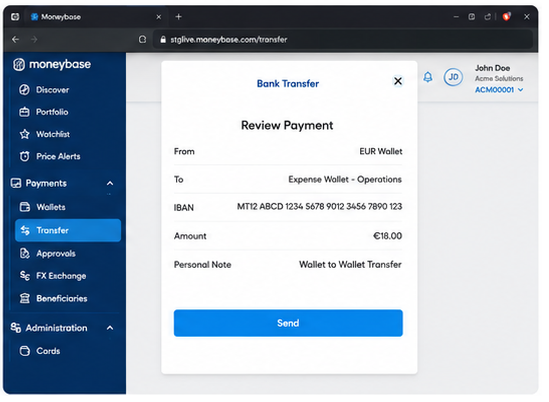
Step 4: Review the transfer
Review the transfer details carefully, including:
- Source wallet
- Destination wallet
- Transfer amount
- Personal note
If everything is correct, click Send.
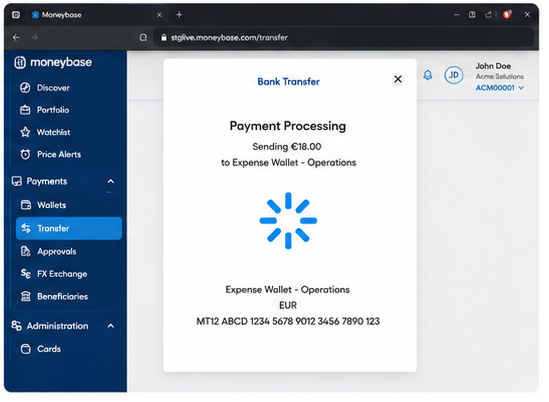
Step 6: Transfer completed
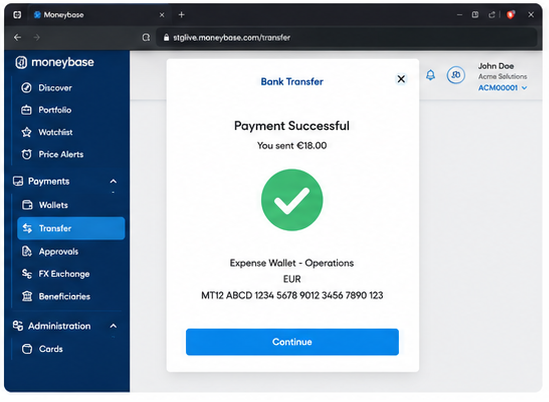
Once the transfer has been processed successfully, a confirmation message will be displayed.
Click Continue to return to your account.
Important information
- Wallet-to-wallet transfers are processed instantly.
- Funds remain within your Moneybase Business account.
- You can only transfer funds between wallets that belong to the same business account.
- Ensure that the source wallet has sufficient available funds before submitting the transfer.
Was this article helpful?
That’s Great!
Thank you for your feedback
Sorry! We couldn't be helpful
Thank you for your feedback
Feedback sent
We appreciate your effort and will try to fix the article